Skip to content
Estimator at a desk pricing a printed Bill of Quantities beside the building plans, the paper BQ a client sends before it goes into Raul Client’s BQ, on paperRaul reads it →
app.raultech.my/calculator
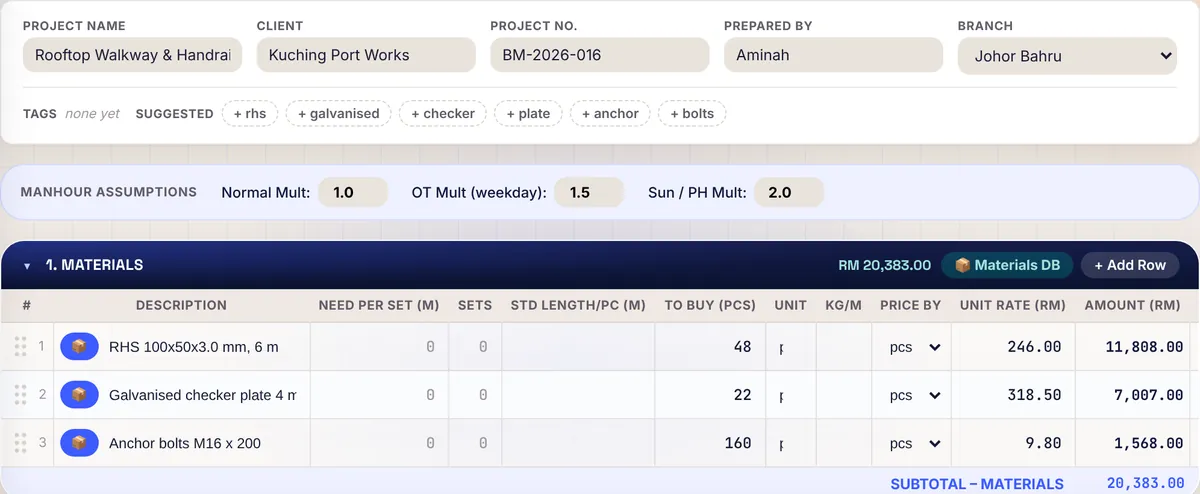
Raul Quotation Calculator for contractors: materials rows with quantity, unit rate and amounts for a steel walkway quotation
Costs stay privateClient BQ in, your rates out
Quotation Calculator and BQ workspace

Quotation and BQ software for Malaysian contractors

Price a quotation from your own costs, or price the BQ a client sends you. The client sees your letterhead and the selling price. Your costs and markup stay with you, and a won quote becomes a project with its budget already in.

14 days free, no card · Every feature on every plan · Site staff are free

From BQ to project

The client’s BQ in. A project out.

01

Client BQ in

A client or main contractor sends their own Bill of Quantities. Import the PDF, a photo of a printed BQ, or their Excel or CSV file. Raul reads it into the client’s own structure. You check the review and correct anything misread, and quantities Raul could not read are flagged for you.

PDFClient BQJPGPhoto of a printed BQXLSExcel or CSV
app.raultech.my/calculator
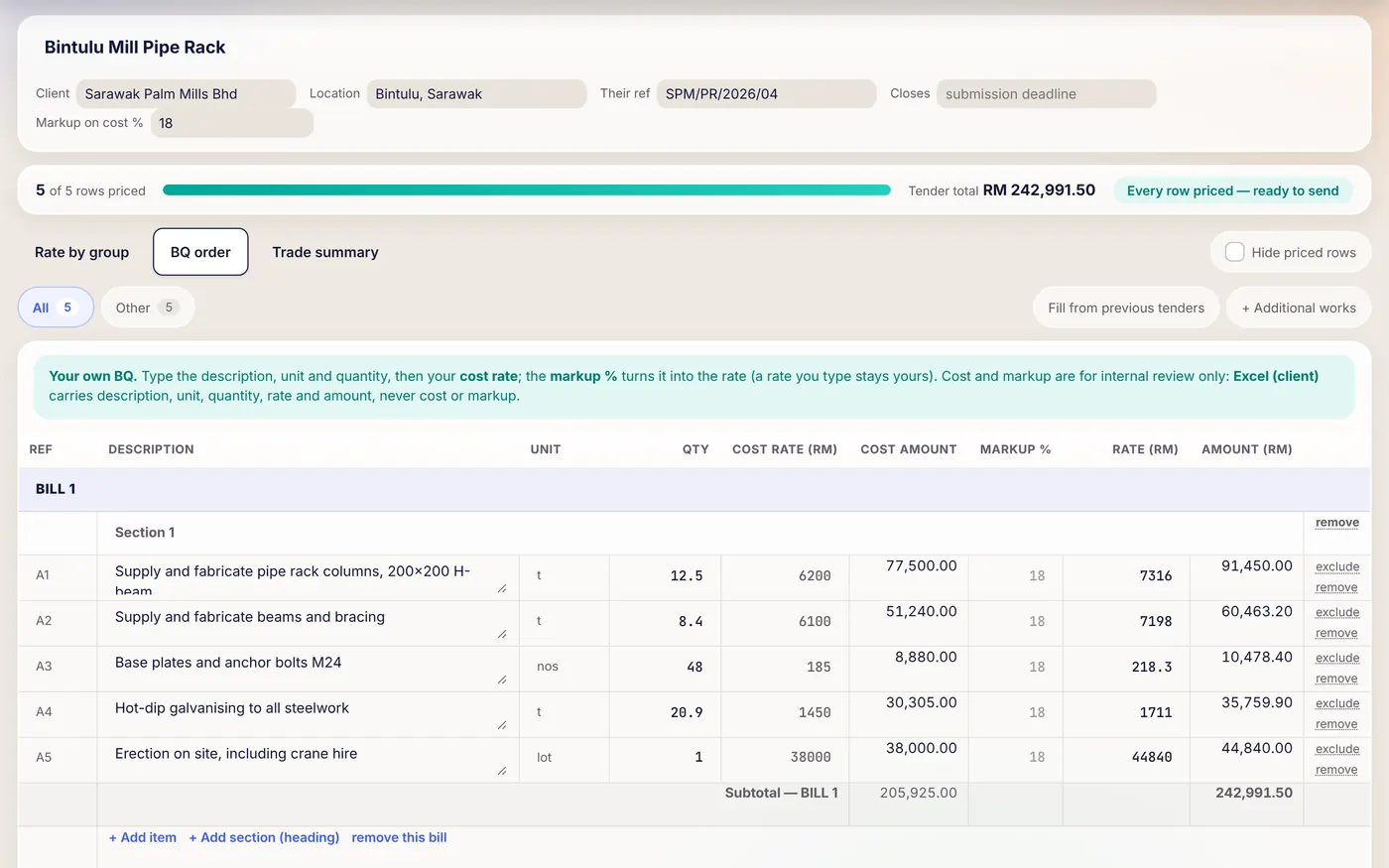
Raul BQ workspace for a pipe rack tender: BQ items with unit, quantity, cost rate, markup and amount
02

Price by group

Rate by group gathers similar items so you type one rate once, and Trade summary totals the tender by trade. Set Markup on cost % once and every row with a cost is priced at that cost plus your markup. A rate you type yourself is never moved by a markup change.

app.raultech.my/calculator
Close-up of the Raul BQ workspace: rate by group, rows priced and tender total
5 of 5 rows priced
03

Cost summary

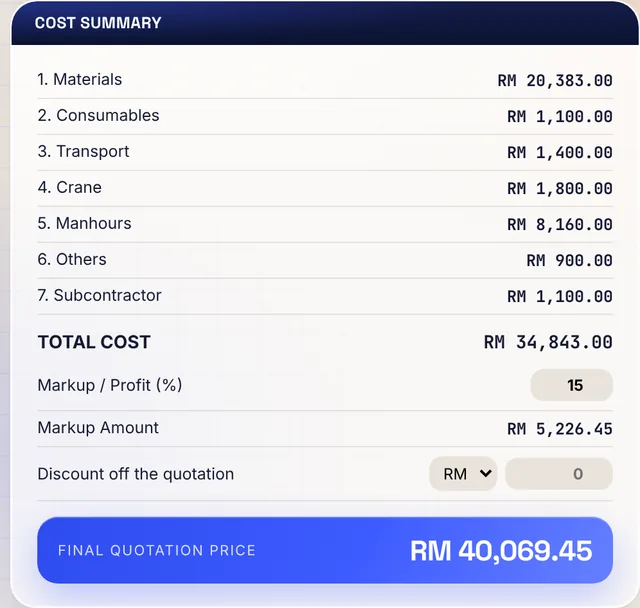
Choose how the quote is laid out: Cost Categories or Work Sections. Pick a saved material from Materials DB and its rate fills in. Set markup and any discount, and Raul works out the selling price.

Total costRM 34,843.00
Final quotation priceRM 40,069.45
Raul quotation cost summary: total cost, markup, discount and final quotation price
04

Send

The quotation PDF carries your letterhead and the selling price. For a tender, the client Excel file and the filled BOQ carry the description, unit, quantity, rate and amount. Your costs and markup are in neither.

PDFQuotation PDFYour letterhead, scope of work, validity, deposit and payment terms
BOQFill client’s BOQ PDFYour rates and amounts written onto the client’s own form
XLExcel (client)Every amount a live formula, so the client can check the arithmetic
05

Won, so it becomes a project

Once you win it, press Convert to Project and the project form opens already filled in. The quote’s costs become the job’s budget, and the quotation stays in your Quotes Library, ready to revise as Rev 2.

QUOTEBintulu Mill Pipe RackConvert to Project
PROJECTBintulu Mill Pipe Rack
Budget filled from the quote’s costs
In detail

Everything behind the five steps.

01 · PRICE IT

Price a quotation from your own costs.

Quotations are priced in the Quotation Calculator. Choose how the quote is laid out: Cost Categories (materials, consumables, transport, crane, manhours, others and subcontractor) or Work Sections, with one section per trade such as Electrical or Roofing.

  • Rows with quantity, unit and rate. Pick a saved material from Materials DB and its rate fills in. Manhours rows take normal, OT and Sunday or public holiday hours.
  • Markup and discount. Set Markup / Profit (%) and any discount in the cost summary. Raul works out the selling price.
  • Revisions. Duplicate a saved quote and it opens as the next revision, such as Rev 2, with every line in. The original is never touched.
02 · PRICE THEIR BQ

Price the BQ a client sends you.

When a client or main contractor sends their own Bill of Quantities, use the BQ workspace inside the Quotation Calculator. Import the PDF, a photo of a printed BQ, or their Excel or CSV file. Raul reads it into the client’s own structure. You check the review and correct anything misread, and quantities Raul could not read are flagged for you. With no client BQ, build your own with Create BQ.

  • Rate by group gathers similar items so you type one rate once. Trade summary totals the tender by trade.
  • Markup on cost %. Set it once and every row with a cost is priced at that cost plus your markup. A rate you type yourself is never moved by a markup change.
  • The top bar counts rows priced and rows still unpriced before you send.
03 · SEND IT

The client sees the price, never your costs.

The quotation PDF carries your letterhead and the selling price. You write the scope of work, set the validity in days, and add a deposit and payment terms if you want them. For a tender, the client Excel file and the filled BOQ carry the description, unit, quantity, rate and amount. Your costs and markup are in neither.

  • Your materials price list. Materials DB holds category, name, size, supplier, unit rate and what the price is by. Import a supplier’s price list from a photo, a WhatsApp screenshot, a PDF, or an Excel or CSV file. Raul reads it into one table and takes the unit price, never the line total from an invoice.
  • A person checks it. Nothing a document read produces is saved until you have checked it. Raul does not make up figures: what it reads is copied from your document, and anything it could not read is flagged for you.
How it works

From quotation to project.

  1. Open the Quotation CalculatorName the project and pick the format.
  2. Add the costsChoose materials from your price list, add manhours, set your markup.
  3. Save QuoteIt goes to your Quotes Library, ready to revise as Rev 2.
  4. Print it for the clientQuotation PDF, with your letterhead and the selling price.
  5. Submit to ManagementIt appears under Quotes to Approve in Project Management.
  6. Convert to ProjectOnce you win it, the project form opens already filled in.
Who it is for

For every estimator.

QS and estimators at construction companies, main contractors and renovation firms, and subcontractors who price a main contractor’s BQ on the main contractor’s own form. A QS or engineer sees every figure in the Calculator, because they are the ones pricing. Every feature is on every plan.

Building & civilRenovation & fit-outM&EElectricalPlumbingAircon & ductingRoofing & ceilingSteel & structuresFinishesLandscapingSubcontractors
FAQ

Common questions

Can I price a BQ that a main contractor sends me?

Yes. Import their PDF, a photo of a printed BQ, or their Excel or CSV file into the BQ workspace. Raul reads it into their own structure, you check it, and you can return your rates on their own form or as an Excel file.

Will the client see my costs and markup?

No. The quotation PDF shows your letterhead and the selling price. For a tender, the client Excel file and the filled BOQ PDF carry only the description, unit, quantity, rate and amount.

Can I trust the figures when Raul reads a BQ or a price list?

A person checks every figure before anything is saved. Quantities Raul could not read are flagged for you, and you can correct anything before saving.

Can I revise a quotation without losing the first version?

Yes. Duplicate a quote in the Quotes Library and it opens as the next revision, for example Rev 2, with every line in. The original is never touched.

What happens to the quotation when I win the job?

Submit the quote to Management, then press Convert to Project in Quotes to Approve. The project form opens already filled in, and the quote’s costs become the job’s budget.

How many client BQs can Raul read each month?

Starter reads 5 client tender BQs a month, Growth 30 and Pro 100. Receipts, delivery orders and price lists have no monthly limit.

Start today

Price the next job in Raul.

14 days free, no card. Or WhatsApp us and we will set it up with you.

+60 16-782 8223